Skip to content
Commercial Proposal · v2.0

The smarter way for cafés and restaurants to serve, manage and grow.

Resta gives customers a fast QR ordering experience while giving restaurant teams complete control over menus, orders, payments, loyalty, branches, staff and performance.

  • Scan
  • Browse
  • Order
  • Split
  • Pay
  • Track
  • Reward
Restaurant Admin
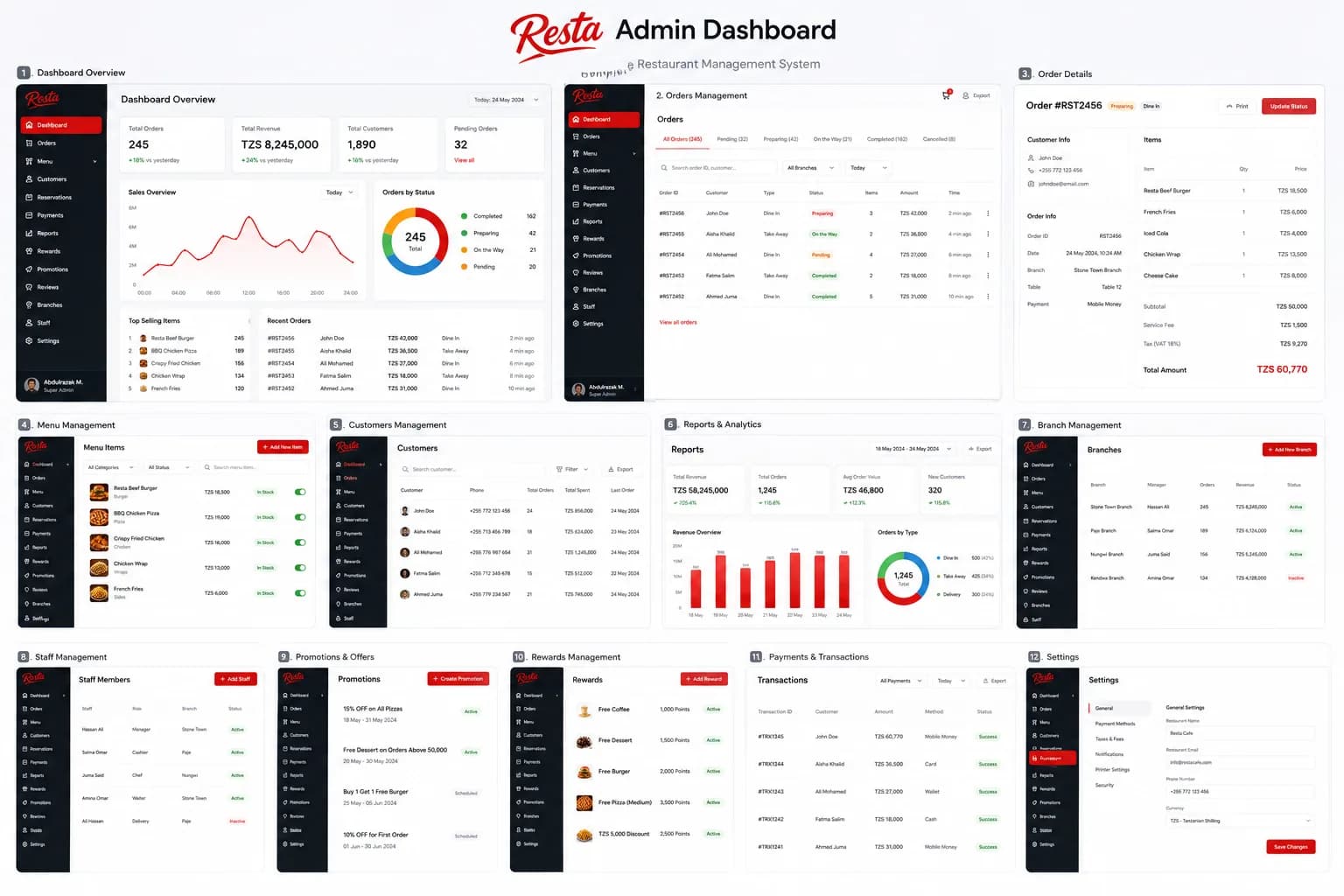
Overview board of the Resta restaurant admin dashboard showing twelve modules from dashboard and orders through to settings.
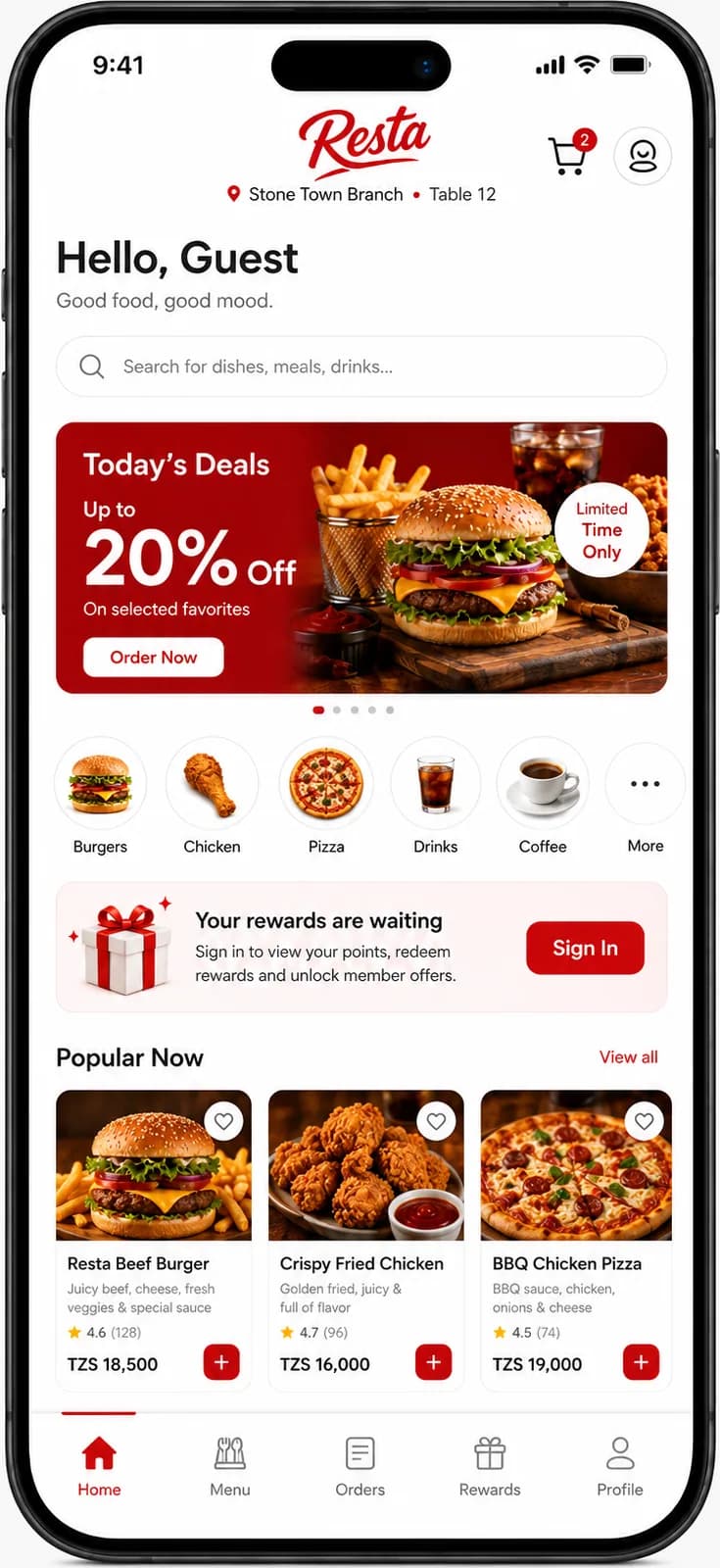
Resta guest home screen showing Stone Town Branch, Table 12, a promotions banner, category shortcuts and popular items.
resta.co.tz/stone-town
  • No app download
  • QR-based access
  • Mobile-first web app
  • English & Kiswahili ready
  • TZS & local payment ready
  • Multi-branch capable

Who Resta is for

Built for the places people actually eat every day.

Resta was designed for independent hospitality businesses in Zanzibar first, then for the multi-branch operators they grow into, not adapted down from enterprise software.
  • Cafés & coffee shops
  • Restaurants
  • Fast-food outlets
  • Bakeries
  • Juice & smoothie bars
  • Dessert shops
  • Takeaway businesses
  • Multi-branch operators

Configured to how you actually serve

The same product runs a single counter or a multi-branch group. Service types, menus and QR codes are configuration, not a different build.

  • Dine-in
  • Takeaway
  • Pickup
  • Table service
  • Counter ordering
  • Branch-specific menus
  • Campaign QR codes
  • Delivery-ready

The operational problem

Service rarely breaks in one place. It leaks in several at once.

None of these are failures of effort. They are what happens when ordering, the kitchen, the counter and the office each keep their own version of the truth.

At the table

  • Slow manual ordering during peak service
  • Incorrect or missed orders
  • Long waiting times before a first order is taken
  • Manual split-bill calculations at the end of a meal

In the kitchen

  • Unclear kitchen order status
  • Verbal handovers that leave no record
  • No reliable timer on how long a ticket has been open
  • Difficult staff accountability across a shift

Behind the counter

  • Repeated menu-printing costs
  • Difficulty changing availability and prices quickly
  • Dependence on phone or chat-based orders
  • Inconsistent experience between branches

In the office

  • Fragmented customer records
  • Limited loyalty visibility
  • Poor branch-to-branch comparison
  • Limited insight into what actually sells

The Resta ecosystem

One product. Two connected layers.

A diner never sees the second layer, but every order they place moves through both of them, on one record.
  1. Diner
  2. QR Web App
  3. Restaurant Operations
Diners

Customer Web App

A QR-accessed mobile web experience. Opens in the browser, keeps branch and table context, and works for guests and members alike.

  • QR, branch and table detection
  • Menu, cart, checkout and payment
  • Split bill and group payments
  • Live tracking, receipts and loyalty
Owners, managers, kitchen and floor staff

Restaurant Administration

A secure dashboard per business. Orders, kitchen display, menus, customers, promotions, staff, branches, tables, finance and reports in one place.

  • Live order queue and kitchen display
  • Menu, pricing and availability control
  • Staff roles, branches, tables and QR codes
  • Finance, settlement and reporting

For dedicated full-system clients the same three layers apply, with the platform layer adapted to the deployment agreement rather than operated centrally by Resta.

QR-first customer journey

From a printed QR code to a paid, tracked order.

Every screen below is from the approved Resta design. Step through the flow at your own pace, or play it as a tour.
Step 1 of 11Scan and open

Runs in the phone browser, nothing to install

The table QR resolves the restaurant, branch and table, then hands over to the menu. A short branded loading state covers session setup only, no install, no account wall.

Split bill

One table. Different orders. Simple payments.

Splitting a bill is where most ordering products quietly give up and hand the problem back to the floor staff. Resta treats it as a first-class flow with real financial rules.

Split bill

Stone Town Branch · Table 12 · Order #RST2468

People (3)

  • YouHost15,537
  • Aisha K.15,537
  • Omar H.15,536
Allocations match the bill, 46,610 of 46,610

Three ways to divide a bill

Split equally
Divide the payable total across the selected participants. Any rounding remainder is assigned predictably and shown before requests go out.
Split by items
Assign menu items and quantities to specific people. Shared fees follow the configured allocation rule rather than landing on one payer.
Custom split
Enter an amount or a percentage per person. The sum must reconcile to the bill exactly before a payment request can be created.

Four ways to reach a participant

  • On-screen QR code

    Anyone at the table scans to open their share

  • Secure share link

    Copy and send through any channel

  • WhatsApp request

    Send the payment request directly

  • Split code

    Short code entered on the Resta payment page

The rules that make it safe

  • Allocations must match the final payable amount to the smallest currency unit.
  • Taxes, service charges, discounts and rewards are distributed transparently.
  • An order cannot be falsely marked fully paid while shares remain outstanding.
  • Failed payments stay recoverable: the participant can retry or change method.
  • Each participant payment is idempotent, so retries never double-charge.
  • Restaurant staff can see split settlement status alongside the order.
  • Refunds preserve allocation and settlement history for reconciliation.

Loyalty, points and real rewards

Turn every visit into a reason to return.

Points are only worth something if they buy something. Resta redeems them against a catalogue the restaurant controls, a free coffee, a dessert, a discount, not an abstract balance.

Resta Points, earn and redeem

Rules and catalogue are set by the restaurant

Resta Points

2,450points

Silver2,450 / 5,000Gold

2,550 points to Gold

Earning

earns 50 points at 2 pts / TZS 1,000

  • Place an order

    2 pts / TZS 1,000

  • Check-in

    50 pts

  • Refer a friend

    200 pts

  • Write a review

    100 pts

Points post only after an order reaches its completed and paid state, and reverse if it is refunded or cancelled.

Redeem for real menu items

  • Free Dessert

    Menu item

    1,500 pts
  • Free Burger

    Menu item

    2,000 pts
  • TZS 5,000 Discount

    Order discount

    2,500 pts
  • Free Pizza (Medium)

    Menu item

    3,500 pts

In the cart

Redeem a reward to see how it reaches the bill.

A redeemed product enters the cart at TZS 0 or as an explicit discount line, so the receipt always shows both the reward and the points it used. Points are reserved at checkout and deducted only once the order is confirmed, a failed order releases them.

What the restaurant controls

  • Points earning rate
  • Reward catalogue
  • Required point value
  • Eligible branches
  • Reward availability
  • Expiry
  • Redemption limits
  • Minimum order rules
  • Combination with other offers

What the customer sees

  • Guest: a clean prompt to sign in, never a fabricated points balance
  • Signed in: current balance, tier, progress and available rewards
  • Reward detail with its terms, validity and eligible branches
  • Redemption confirmation before any points move
  • Digital membership card with member ID and QR
  • Full point history, including reversals

Supporting screens

The screens that decide whether it survives real service.

Authentication, receipts, notifications, accessibility, empty carts and failed payments. A product is judged on these, not on its happy path.

Authentication, search and receipts

Guest ordering stays available throughout. Signing in with a phone OTP unlocks points, history and saved details.

  • Sign in / create account
  • OTP verification
  • Search & filters
  • Order success
  • Digital receipt

Orders, rewards and membership

Active orders and history, reward detail with its terms, the digital membership card, notifications and post-order feedback.

  • Active orders & history
  • Reward details
  • Membership card
  • Notifications
  • Rating & feedback

Support, language and account

Human support channels, English and Kiswahili, accessibility preferences including reduced motion, plus saved payment methods and addresses.

  • Help & support
  • Language & accessibility
  • Personal information
  • Payment methods
  • Saved addresses

Advanced split, failure and empty states

The states that decide whether a product survives real service: item-level splits, custom amounts, failed payments, empty carts and the guest-versus-member home.

  • Split by items
  • Custom split amount
  • Payment failed / retry
  • Empty states
  • Guest vs signed-in home

Restaurant administration

Everything the restaurant runs on, scoped to its own data.

Select a module to move through the dashboard your team would use every day. Each business sees only its own orders, customers, menus, staff and reports.

Daily operations

Menu & growth

Team & locations

Finance & reporting

Restaurant Admin

Dashboard

The state of the business today, in one view.

  • Today's orders, sales and pending orders
  • Customers and average order value
  • Sales trend and order-status distribution
  • Best-selling products and recent orders
  • Branch comparison and period filters
  • Alerts for delayed orders, unavailable items and payment issues

Also included

Kitchen display

A separate, deliberately reduced view for the people cooking. No financial data, no customer records, just what has to be made and how long it has been waiting.

  • Queue grouped by new, preparing, ready and delayed
  • Order number, items, modifiers and kitchen notes
  • Table or fulfilment type
  • Elapsed timer and priority
  • Large touch targets for a busy pass
  • Station routing for drinks, kitchen or bakery where configured

No mockup was supplied for the kitchen display, so it is described rather than illustrated.

Deployment

Managed platform, or a dedicated environment.

The same governed product core serves both. What changes is who operates it, where it runs and how releases reach it.

Managed platform

Multiple restaurants share one governed Resta platform.

  • Each restaurant is a securely isolated tenant
  • Data, staff, customers, menus, payments, reports and branches stay separated
  • A user from one restaurant never sees another restaurant's data
  • Resta manages subscriptions, system health, releases and platform support
  • Feature entitlements are configured per plan or per tenant

Dedicated deployment

One client or group receives its own approved environment.

  • Branding, domain, configuration and integrations defined by contract
  • Hosting and release management agreed per deployment
  • May include a central owner dashboard across your own branches
  • Environment stays on its installed version until an approved upgrade
  • Configuration and extension are preferred over forks, to protect upgradeability

Customer web-app features

The complete customer feature set.

Grouped by what the diner is trying to do, from opening the menu to leaving feedback.

Getting from a printed QR code to a usable menu with nothing in the way.

  • QR-based access
  • Restaurant and branch detection
  • Table detection
  • Short branded loading state
  • Guest browsing and ordering
  • Sign in and create account
  • OTP verification
  • Session recovery after refresh or signal loss
  • English and Kiswahili readiness
  • Accessibility preferences

Payments & local readiness

Built for how Tanzania actually pays.

Mobile money first, cards and cash alongside it, with every transaction traceable end to end.

Mobile money

  • M-Pesa
  • Mixx by Yas
  • Airtel Money
  • HaloPesa

Card

  • Bank cards

At the restaurant

  • Cash
  • Pay at counter
  • Pay at table

Payment options are configured according to the restaurant, country, provider approval and commercial agreement. A method appearing here is in product scope, it is not a claim that every provider is already contracted in every market.

What surrounds every payment

  • Unique internal reference on every payment attempt
  • Provider transaction reference where available
  • Idempotent callbacks and retries
  • Digital receipt reconciling to reports
  • Refund records
  • Failed-payment recovery without losing the cart
  • Partial split payments
  • Settlement visibility for staff
  • Payment-method controls per branch
  • No storage of prohibited card information

Integrations

Honest about what connects today.

Each integration below carries its real status. Nothing here is described as live before it has been validated.
  • Mobile-money providers

    Commercial access and reconciliation validated per provider and market.

    Subject to provider approval
  • Card payment gateways

    Tokenised, provider-controlled card handling.

    Subject to provider approval
  • WhatsApp notifications

    Templates, consent and delivery-status handling.

    Configurable
  • SMS

    OTP, order updates and split requests.

    Configurable
  • Email

    Receipts, notifications and announcements.

    Configurable
  • POS systems

    Scoped per client after technical API validation.

    Planned
  • eZee and similar hospitality systems

    Order, menu or accounting synchronisation where the API permits.

    Planned
  • Kitchen printers

    Local connector or browser-compatible path.

    Configurable
  • Receipt printers

    Operational print output for the counter.

    Configurable
  • Accounting systems

    CSV or API export for downstream reconciliation.

    Planned
  • Delivery partners

    Added against validated demand per market.

    Planned
  • Analytics platforms

    Privacy-conscious, consent-controlled.

    Configurable
  • Webhooks & APIs

    Versioned, authenticated and tenant-scoped.

    Available

Every integration carries an explicit readiness label. Nothing on this page is presented as live unless it is marked available, and third-party logos are not displayed.

Security, privacy and control

Built for everyday operations. Controlled for serious business.

Tenant isolation is enforced on the server, not in the interface, a change in the browser cannot reach another restaurant's data.

Access

  • Secure authentication
  • OTP verification
  • Role-based access
  • Branch-level permissions
  • Staff permissions
  • Session management
  • Password recovery
  • Two-factor authentication for administration where enabled

Isolation

  • Restaurant data isolation
  • Server-side tenant scoping
  • Support access that is time-bound and logged
  • Account suspension without data loss
  • Least-privilege administrative roles

Traceability

  • Activity logs
  • Audit trails
  • Payment references
  • Security-event logging
  • Login activity

Resilience & privacy

  • Encrypted transport
  • Secure backups
  • Restore procedures
  • Rate limiting
  • Abuse prevention
  • Privacy controls
  • Data export and deletion policies

Resta makes no certification claims in this proposal. The controls above describe how the product is built and operated; any formal compliance requirement is assessed against your specific deployment.

Performance, accessibility and PWA

Designed for a real phone on a real network.

A diner on a slow connection at a busy table is the design target, not a desktop on office wi-fi.

Built for real mobile conditions

  • Mobile-first responsive web app
  • No app-store download
  • Fast initial loading
  • Image optimisation
  • Low-data consideration
  • Progressive enhancement
  • Installable PWA where supported
  • Offline-friendly static assets where appropriate

Recoverable by design

  • Retry states on every payment path
  • Session recovery after refresh or brief signal loss
  • Bounded, monitored, idempotent background retries
  • Core ordering survives non-critical service failure

Usable by everyone

  • Accessible forms
  • Keyboard navigation
  • Clear focus states
  • Screen-reader-friendly semantics
  • Sufficient contrast
  • Reduced-motion preference
  • Text resizing without layout breakage
  • English and Kiswahili readiness

Business benefits

What changes, and for whom.

Different people in the same business measure this product differently. Here is what each of them gets.
  • Faster ordering
  • Less waiting
  • Clear menus and prices
  • Easy customisation
  • Transparent totals
  • Split-bill convenience
  • Multiple payment options
  • Live order updates
  • Loyalty rewards
  • Digital receipts

These are the operational outcomes the product is designed to support. Resta does not promise guaranteed revenue growth.

Commercial models

Two ways to work with Resta.

Both models share the same approved customer and restaurant feature set. They differ in hosting, ownership boundaries, how updates arrive, who maintains the platform and who administers it.

Managed Subscription

Start quickly. Stay continuously updated.

Stay focused on your restaurant while Resta manages the platform, updates, routine maintenance, security improvements and continued product development.

  • Resta hosts and operates the managed platform
  • Compatible product updates delivered continuously or in release windows
  • Routine maintenance included while the subscription is active
  • Security updates, monitoring and backups per selected plan
  • Plan-based feature access and entitlements
  • Securely isolated data, menus, staff, customers, reports and payments
  • Resta manages onboarding, account status, support access and system health
  • Lower initial entry, recurring commitment
Third-party costs, premium custom development, unusual integrations and out-of-scope work may be quoted separately.

Best for, Businesses that want simplicity and continuous improvement.

Request Subscription Options

Full System Sale

Deploy a dedicated system for your operation.

Own a dedicated deployment built around your operation, then request maintenance, upgrades, new features or integrations whenever your business requires them.

  • Dedicated environment for one client or approved restaurant group
  • Client-managed hosting, or managed by Resta under separate agreement
  • Dedicated branding, configuration, domain, infrastructure and integrations
  • Client controls its environment per the commercial agreement
  • Versioned release packages with explicit upgrade scopes
  • Maintenance and support are optional contracted services
  • Defined handover package with configuration and administrator access
  • Higher one-time project investment
Future updates are not automatically included. Source-code rights, licensing, resale restrictions and IP rights are determined by the signed contract: the term “full system sale” does not by itself transfer the Resta brand, reusable platform IP or resale rights.

Best for, Businesses needing a dedicated, controlled deployment.

Request a Dedicated-System Quote

Side by side

Managed Subscription compared with Full System Sale across hosting, updates, maintenance, control and support.
CapabilityManaged Subscription
Payment model (key difference)Recurring subscription by selected plan
HostingManaged by Resta according to plan
Compatible updates (key difference)Delivered continuously or through release windows while active
Routine maintenance (key difference)Included while the subscription remains active
Initial investmentLower recurring-entry model
DeploymentShared managed platform with securely isolated tenants
Platform administrationOperated by Resta
Custom developmentConfiguration and plan modules; major work quoted separately
Source code & IPNo source-code or IP transfer
SupportIncluded according to plan
Exit & handoverData export and subscription closure process
Best forSimplicity and continuous improvement

The best model depends on your number of branches, internal technical capacity, desired control, customisation needs and long-term operating plan.

Request a tailored quotation

No prices are published in this proposal. Subscription tiers, one-time fees, warranty duration, SLA and legal terms are confirmed in a written quotation and contract.

Implementation journey

From first conversation to controlled launch.

A sequence, not a promise of a date. Timelines are confirmed after scoping.
  1. Discovery and business assessment

    Current service model, branches, menu structure and goals.

  2. Commercial model selection

    Managed subscription or dedicated deployment.

  3. Scope confirmation

    Modules, integrations and anything quoted separately.

  4. Brand and branch setup

    Business identity, branches, hours and service types.

  5. Menu and modifier preparation

    Categories, products, variants, add-ons and pricing.

  6. Payment and integration setup

    Provider onboarding, notification channels and receipts.

  7. Staff roles and operational configuration

    Permissions, kitchen routing and internal policies.

  8. QR generation and table mapping

    Table records, printable QR codes and campaign codes.

  9. Testing and team training

    End-to-end order, payment, split and refund rehearsal.

  10. Controlled launch

    A limited service window before full rollout.

  11. Support and optimisation

    Menu tuning, promotions and reporting review.

  12. Updates per commercial model

    Continuous for subscription; versioned for dedicated.

What sets the timeline

Resta does not quote a fixed duration before scoping. These are the factors that decide it.

  • Number of branches
  • Menu complexity
  • Data readiness
  • Payment-provider approval
  • Required integrations
  • Custom branding
  • Dedicated-development scope
Request a scoped timeline

Questions

Frequently asked questions

  • No. Resta is a responsive web app. A diner scans a QR code and the menu opens in the phone browser, there is no app store step and nothing to download. Phone frames in this proposal are presentation devices only.

Next step

Ready to give your restaurant a smoother digital experience?

Tell us how you serve today. We will walk you through a live demonstration, then put together a written quotation for the model that fits.

Preferred contact method

Required fields are marked with an asterisk.